
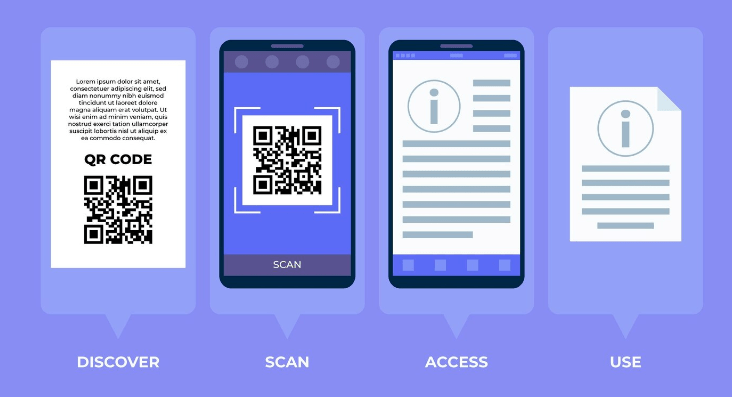
In today’s fast-paced digital world, efficiency is everything—especially when it comes to sharing important documents. Whether you’re distributing information at a conference, sharing product manuals with customers, or providing downloadable guides to your clients, the quicker and easier it is to access a file, the better. That’s where QRSpider’s innovative QR code solution comes in. With QRSpider, you can generate a QR code for any PDF document, making it easier than ever for others to access and download your files.
Let’s take a closer look at how QR codes can transform the way you share PDFs and improve the efficiency of file distribution.
What Is a QR Code?
In case you’re not already familiar, QR (Quick Response) codes are two-dimensional barcodes that can store a large amount of data. When scanned using a smartphone or tablet, a QR code can perform a variety of tasks, from opening a website to displaying text or sharing a file. QR codes have become an integral part of daily life, popping up on everything from product packaging to business cards and advertisements.
Now, with QRSpider, you can use this versatile tool to share PDF documents with ease. All you need to do is upload your PDF to QRSpider’s platform, generate a QR code, and you’re ready to share your document with anyone, anywhere.
Why Use QR Codes for PDFs?
QR codes are an incredibly efficient way to share PDF documents for several reasons:
-
1)Easy Access: Instead of sending an email with an attachment or requiring someone to visit a website to download a file, all they need to do is scan the QR code. It’s fast, simple, and convenient for anyone with a smartphone.
-
2)Instant File Sharing: There’s no need for complicated links, long download pages, or sign-ins. Once scanned, the QR code leads directly to the PDF file, where the user can view or download it immediately.
-
3)No Limits on Sharing: You can print the QR code on flyers, posters, business cards, or even digital ads. This makes it easy to distribute documents in both physical and digital environments, vastly expanding your reach.
-
4)Environmentally Friendly: Gone are the days of handing out stacks of printed documents. With a simple QR code, you can provide all the information people need in a single digital file, cutting down on paper waste.
How Does QRSpider’s PDF Sharing Work?
Using QRSpider to generate a QR code for your PDF is a seamless process. Here’s how it works:
-
1)Upload Your PDF: Start by uploading your PDF document to the QRSpider platform. It could be anything—an eBook, a product manual, a presentation, or a detailed report. QRSpider handles all types of PDF files, and there’s no file size limit.
-
2)Generate the QR Code: Once your file is uploaded, QRSpider generates a unique QR code for you. This QR code is linked directly to your PDF document.
-
3)Share the QR Code: Now that you have your QR code, you can place it wherever you need to—whether it’s printed on marketing materials, added to a presentation slide, or shared online. The possibilities are endless.
-
4)Scan and Download: When someone scans the QR code with their smartphone or tablet, they are instantly directed to your PDF document. They can view it, download it, and save it for later, all in just a few taps.
It’s that simple!
Expanding Your Reach with QR Codes
One of the most significant advantages of using QR codes to share PDFs is the expanded reach they offer. Think about it: a traditional link can only be shared in digital spaces, like emails or websites. But a QR code can exist anywhere. By printing a QR code on physical materials or integrating it into presentations, you bridge the gap between the physical and digital worlds.
For example, imagine you’re giving a presentation at a conference. Instead of handing out printouts of your slides or asking the audience to visit a website later, you can simply display a QR code on the screen. Attendees can scan it on the spot and instantly download your PDF materials to their devices. This not only makes the sharing process smoother but also ensures everyone has immediate access to the information.
QR codes also come in handy for sharing PDFs at events, on flyers, and in product packaging. Let’s say you’ve just launched a new product, and you want to provide customers with a detailed user manual. By printing a QR code on the product’s packaging or inside the box, customers can scan it to download the manual directly to their phone. No need for bulky instruction booklets or complicated websites—just a simple scan, and the file is ready to go.
Improving Efficiency in File Distribution
Sharing files the traditional way—via email attachments, cloud storage links, or printed handouts—can sometimes feel cumbersome, especially when dealing with large groups of people or distributing documents in a variety of settings. QRSpider’s QR codes for PDF sharing streamline this process and reduce friction, allowing users to access files with minimal effort.
Here’s why this improves file-sharing efficiency:
-
1)No More Large Email Attachments: Emailing large PDF files can be problematic, especially when they exceed attachment size limits. With QRSpider, you can upload your PDF once and share it via a QR code, bypassing email attachment restrictions altogether.
-
2)Avoiding Broken Links: Links can sometimes break or become outdated, leading to confusion and frustration for those trying to access your document. QR codes eliminate this issue, as the code itself remains static, while the file behind it can be updated at any time if needed.
-
3)Real-Time Updates: One of the most valuable features of QRSpider’s platform is the ability to update your PDF without needing to change the QR code. If you make changes to the document, the updated version will automatically be available to anyone who scans the code. This is perfect for dynamic files like event schedules, evolving reports, or product manuals that need frequent revisions.
Use Cases for QR-Powered PDF Sharing
The applications for QR-powered PDF sharing are endless, but here are a few common use cases where QRSpider can enhance file distribution:
-
1)Business and Sales Presentations: Share slides, brochures, or detailed product information by displaying a QR code at the end of your presentation.
-
2)Event Handouts: Instead of printing hundreds of flyers or brochures, provide a single QR code that attendees can scan to download all the event information.
-
3)Product Packaging: Offer customers instant access to user manuals, warranty details, or installation guides with a QR code printed on the product’s packaging.
-
4)Educational Materials: Teachers and lecturers can use QR codes to share homework assignments, reading materials, or study guides with students.
A Smarter Way to Share
At QRSpider, we’re committed to making file sharing easier and more efficient. With QR codes, you can quickly distribute PDF documents without the hassle of managing multiple links, email attachments, or printed copies. Whether you’re a business professional, an educator, or just someone looking for a convenient way to share information, QRSpider’s PDF-sharing solution has you covered.
So why not give it a try? Upload your PDF to QRSpider today, generate a QR code, and experience a smarter way to share your documents with the world.