
In today’s digitally immersed era, social media has become an essential tool for our daily communication and information sharing. However, with the increase in various platforms, managing multiple social media accounts can often be cumbersome. To simplify this process, QR codes have emerged as an efficient way to consolidate all social media profiles into one, enhancing sharing convenience.
Advantages of QR Codes
QR codes are patterns composed of black and white square modules that can store information and be quickly read by scanning with a mobile phone. The advantages of this technology include:
- 1)Large Information Capacity: QR codes can store various types of information, including links, text, and contact details, making them ideal for consolidating social media accounts.
- 2)Convenience and Speed: Users only need to scan the QR code with their phone, eliminating the need to manually enter complex links, which saves time and effort.
- 3)High Customizability: QR codes can be customized in appearance, allowing users to showcase their personal brand and style to a certain extent.
- How to Integrate Social Media into a QR Code
- Integrating social media and creating a QR code that includes links to all your social platforms is actually quite straightforward. Here are a few simple steps:
-
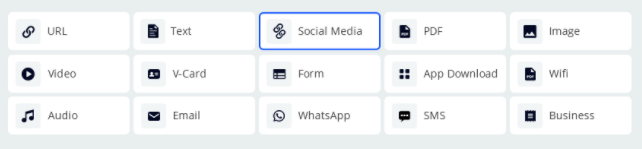
Step 1: Choose the QR Code Type
Select the Social Media Type
-
Step 2: Add Links
In the QR code generation tool, enter the links to all your social media profiles. This can include, but is not limited to:Facebook
Instagram
X (formerly Twitter)
LinkedIn
Personal blog or website 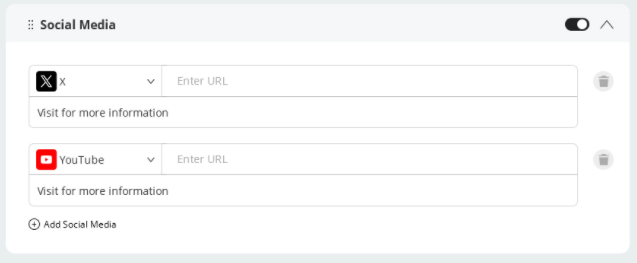
-
Step 3: Customize the QR Code Appearance
Many QR code generators offer customization features, so take advantage of this to design a QR code that aligns with your personal brand. For example, you can choose unique colors, patterns, or backgrounds to add personalized elements to the QR code.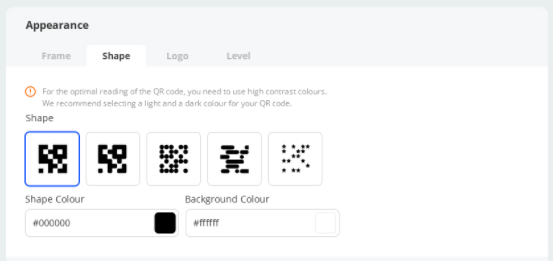
-
Step 4: Generate and Save the QR Code
Once you’ve completed the setup, click to generate the QR code. Save the QR code image, and you can use it on business cards, social media profiles, and any other platforms.
- How to Use QR Codes Effectively
-
Once you’ve generated the QR code, here are some effective ways to use and promote it:
-
1)Social Media Profiles: Place the QR code in your profiles across major social media platforms to allow friends and potential clients to quickly scan and access all your social media information.
-
2)Business Cards: Include the QR code on your business cards so you can easily share your social network when attending events or meetings.
-
3)Promotional Materials: Use QR codes on event brochures, posters, or product packaging to attract people to scan and increase visibility.
-
-
Considerations
When integrating social media into QR codes, keep the following points in mind:1)Privacy Protection: Ensure that the links shared via QR codes do not disclose sensitive or personal information, and set appropriate privacy permissions.
2)Regularly Update Links: As social media platforms evolve, you may change platforms or delete old accounts. Regularly check and update the links in your QR code to maintain accuracy and relevance.